We may earn a commission if you make a purchase through the links on our website.
Remove Unused Computer Accounts & Users from Active Directory with a Cleanup Tool
UPDATED: December 29, 2025

The Security Threat of Inactive Accounts
Inactive user and computer accounts not only clutter up your system, but they also pose serious security threats. Hackers frequently target unused or disabled accounts to gain access into your network.
Deactivating and Deleting Accounts
When employees leave the company, it is imperative that you disable the account immediately, and keep it disabled for a period of time decided upon by your organization. If you decide that the period of time is six months for example, you should permanently delete the account after six months. However, the period of time between disabling the account and deletion may need to be decided on an individual basis. If there is a reasonable chance that the employee may return to work (after a leave of absence for example), then keep the account disabled for that specific amount of time.
Tools for Account Management
Before permanently deleting an account, it is best practice to export the information so that you can view it at a later time if needed. A quick and easy way to manage Active Directory cleanup is to use a tools like ManageEngine ADManager Plus.
ManageEngine ADManager Plus – FREE TRIAL
ManageEngine ADManager Plus is simple to use, and with just a few clicks, you can remove the unused computer accounts and users.
The steps are:
- Download the tool.
- Log in and set up your AD.
- Navigate to the Reports tab on the dashboard.
- Sort the AD objects by Account Status to get a list of the inactive users/accounts
- From the Actions dropdown list, select Delete users.
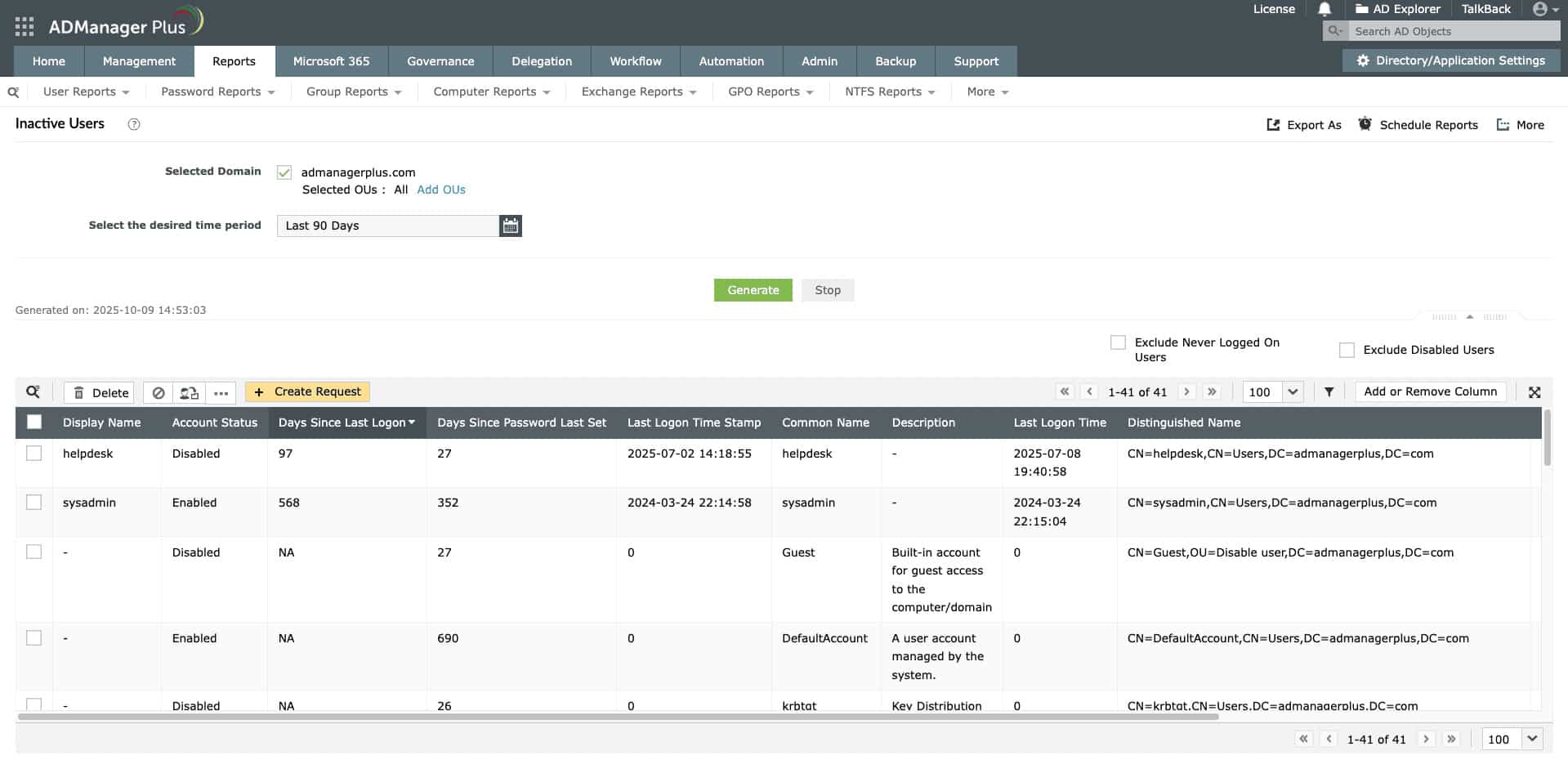
You can even use this tool to delete outdated groups.
Try this tool with a 30-day free trial.
AD Cleanup Tool FAQs
What types of accounts should be cleaned up?
All types of accounts should be reviewed and cleaned up as needed, including user accounts, computer accounts, and group accounts.
How do I identify old accounts that need to be cleaned up?
You can identify old accounts by reviewing the last login time for each account, looking for accounts that have not been used in a long time, or using tools like PowerShell scripts or third-party software to identify inactive accounts.
How do I safely remove old accounts from Active Directory?
To safely remove old accounts from Active Directory, you should first disable the account, wait for a period of time to ensure that it is not needed, and then delete the account. Before deleting the account, make sure to transfer ownership of any files, folders, or resources that are associated with the account.
How often should I clean up old accounts on Active Directory?
A: It is a good practice to clean up old accounts on Active Directory on a regular basis, such as once a quarter or once a year, to ensure that the directory remains secure and efficient.
What are some best practices for cleaning up old accounts on Active Directory?
Some best practices for cleaning up old accounts on Active Directory include developing a policy for account cleanup, regularly reviewing and auditing accounts, keeping a record of all account cleanup activities, and ensuring that all accounts are properly disabled and deleted.